Chapter 3 Strings, Vectors, and Arrays
3.1 Namespace using Declarations
- A
usingdeclaration lets us use a name without qualifying the name with a namespace prefix:using namespace::name.- It is still ok to explicitly use the namespace afterwards.
- Each
usingdeclaration can only introduce one name.
- Headers should not include
usingdeclarations. If a header has ausingdeclaration, than every program that includes that header gets the sameusingdeclaration, which may not be intended.
3.2 Library string Type
- The header
stringmust be included;stringis defined in thestdnamespace.
Defining and Initializing strings
- String literals are arrays of
const chars, so initializing from a string literal is actually initializing from a character array.
// Empty string
string s1;            // default initialization

// From another string
string s2(s1);        // direct initialization
string s2 = s1;       // copy initialization

// From a string literal (basically the same as from a character array)
string s3("value");   // direct initialization
string s3 = "value";  // copy initialization

// From a single character
string s4(n, 'c');    // direct initialization only (two values)

// From a character array (C-style string)
char arr[] = "value";
string s5(arr);       // direct initialization (null-terminated only)
string s5 = arr;      // copy initialization (null-terminated only)
string s5(arr, 3);    // direct initialization only (specific length)
Operations on strings
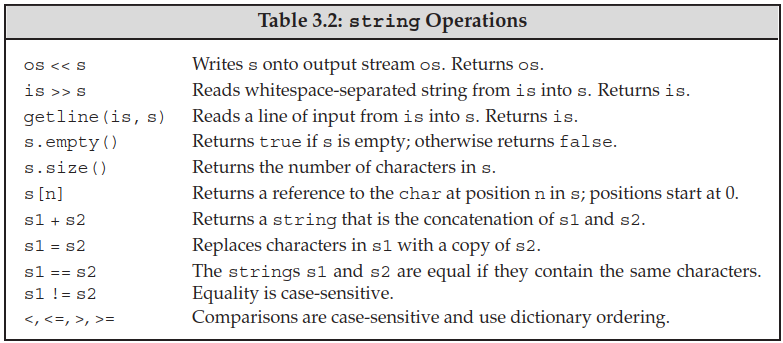
- Strings are mutable in C++, unlike Python or Java.
- Reading and writing a string:
getline(is, s)reads the given stream up to and including the first newline, and stores it not including the newline in the string argument. Like the input operator,getlinereturns theistreamargument.
- Basic operations:
s.size()returns astring::size_typevalue (an unsigned type big enough to hold any size). Useauto/decltype(s.size())to define variables for storing the size.- These companion types make it possible to use the library types in a machine-independent manner.
- Be careful of expressions that mix signed and unsigned (size) data.
- Strings are compared using the same strategy as a case-sensitive dictionary.
- Adding two strings yields the concatenation of both strings.
- Type conversion:
- The
stringlibrary lets us (implicitly) convert both character literals and string literals tostringobjects. Therefore, we can use them where astringis expected. However, we need to be sure that at least one operand to each+operator must be ofstringtype to trigger such type conversion.
- The
string s1 = "hello", s2 = "world";
string s3 = s1 + ", " + s2 + '\n';
string s4 = s1 + ", ";              // ok: adding a string and a literal
string s5 = "hello" + ", ";         // error: no string operand
string s6 = s1 + ", " + "world";    // ok: each + has a string operand (left to right)
string s7 = "hello" + ", " + s2;    // error: can't add string literals
Dealing with the Characters in a string
- Functions for handling the characteristics of a character (defined in
cctype):
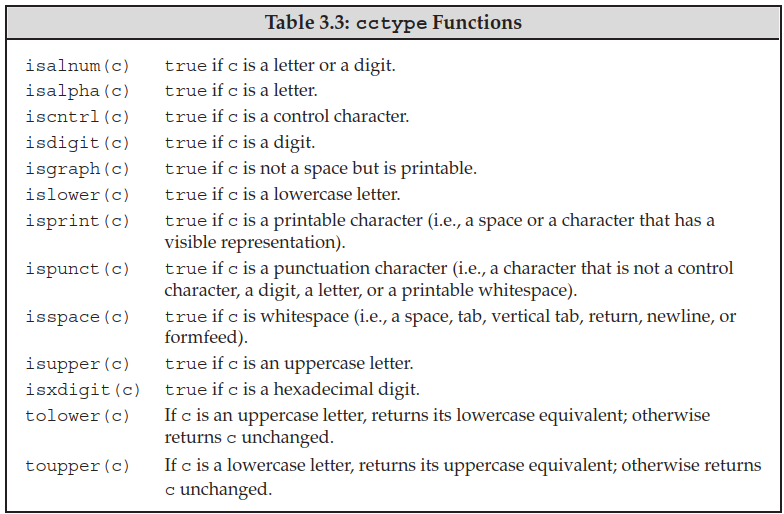
- To access individual characters, we can use a subscript operator (
[], takes astring::size_typevalue) or an iterator (section 3.4).- Indexing outside of the string’s bounds will not be checked and is undefined behavior.
- Range-based
foriterates through the elements in a given sequence and performs some operation (read or change) on each value:
for (declaration : expression) {
    statement
}

// Note: for const strings, each element is a reference to const char (section 2.5)
const string s = "xxx";
for (auto &c : s) {  // Here c is of type const char &
    // process character c
}
3.3 Library vector Type
- A
vectoris a class template. Class templates can be thought of as instructions to the compiler for generating classes or funcitions - instantiation. - We can define
vectors to hold objects of most types. Since references are not objects, we cannot havevectors of references.- Some compilers may require old-style declarations for
vector<vector<int> >.
- Some compilers may require old-style declarations for
Defining and Initializing vectors
- Value initialization: if an object is constructed with an empty initializer, value initialization is performed. Refer to section 7.5.3 for details.
- Examples of value initialization:
T(),T obj{},T{}. Default initialization only applies forT objandT obj[](no initializer is provided). Check section 7.5.3 (The Role of the Default Constructor) for more details. - If
Thas user-defined default constructor, then it is default-initialized (using the constructor).- If
Thas a deleted default constructor, value (default) initialization will fail.
- If
- Otherwise, if
Tis an array type, each element of the array is value-initialized. - Otherwise, the object is zero-initialized (e.g. built-in types).
- Examples of value initialization:
- We must use direct initialization to supply a size. How this is enforced (
explicit) is described in section 7.5.4. - If list initialization is used to construct a
vector, the compiler will attempt to list-initialize it first and then fall back to direct-initializing thevector.- “Attempt”: type conversions are allowed as long as they are not narrowing conversions.
// Empty vector
vector<T> v1;                // default initialization

// From another vector
vector<T> v2(v1);            // direct initialization
vector<T> v2 = v1;           // copy initialization

// From size & element value
vector<T> v3(n, val);        // direct initialization only: n elements with value val
vector<T> v4(n);             // direct initialization only: n value-initialized elements
// vector<T> v4 = n;         // error

// List initializer
vector<T> v5{a, b, ...};     // list initialization (without =)
vector<T> v5 = {a, b, ...};  // list initialization (with =)
vector<T> v6{n};             // not expected behavior: direct initializing the vector with a size
Adding Elements to a vector
- Because
vectors grow efficiently, it is often unnecessary - and can result in poorer performance - to define avectorof a specific size. The only exception is if all elements are of the same value. - We cannot use a range
forif the body of the loop adds elements to or erase elements from thevector.- Range
forwill get the iterators at the start; if the vector grows (is reallocated), the iterators will be invalidated. See section 5.4.3 for details. - Alternative: use the return iterator of
insert()anderase()to move to the next element.
- Range
Other vector Operations
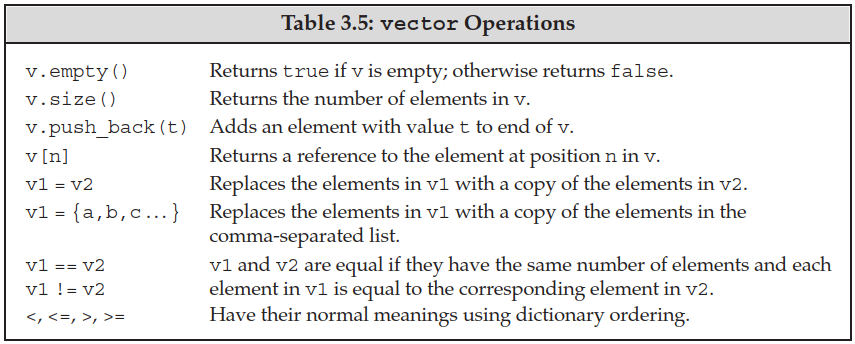
sizereturns a value of thesize_typedefined by the correspondingvectortype:vector<T>::size_type.- The equality and relational operators work the same as
stringoperations: dictionary ordering.- We can compare two
vectors only if we can compare the element in thosevectors.
- We can compare two
- Subscripting an element that doesn’t exist is an error that compilers are unlikely to detect. So-called buffer overflow errors are the result of this.
3.4 Introducing Iterators
- All of the library containers have iterators, but only a few of them support the subscript operator.
- A valid iterator either denotes an element or a position one past the last element in a container. All other iterator values are invalid - dereferencing or incrementing an invalid iterator (or an off-the-end iterator) has undefined behavior.
Using Iterators
- Types with iterators have members
begin()andend()to return iterators for the first or the one-past-the-end (off-the-end iterator) element. - Iterators can be dereferenced using
*and->operators similar to pointers. - Moving an iterator by one element:
++iteroriter++(next),--iteroriter--(previous).- Some stream iterators can only be incremented.
- We should compare two valid iterators using
==or!=: most iterator types have no relational operators (<,>,<=,>=). - The library types with iterators define types named
iteratorandconst_iterator:const_iteratorbehaves like a pointer toconst(ambiguity in original text here).- If the container (or
string) isconst, then we may only use itsconst_iteratortype:begin()andend()returnconst_iterator. - Otherwise, we may call
cbegin()andcend()to getconst_iterators.
- If the container (or
Iterator Arithmetic
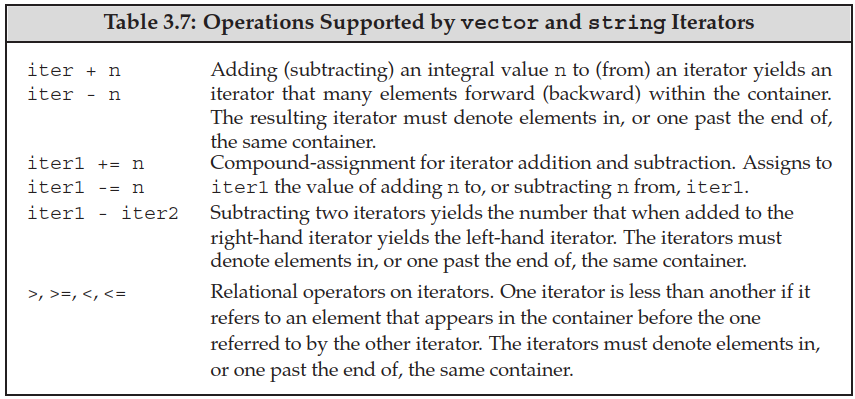
- Only random-access iterators (e.g.
vectorandstring) support iterator arithmetic. - Subtracting two iterators yields the number of elements between them in the signed type
difference_typedefined by the container. - Classic example of iterator arithmetic usage: binary search.
- Jumping to the middle of a sequence:
mid = beg + (end - beg) / 2;.
- Jumping to the middle of a sequence:
3.5 Arrays
Defining and Initializing Built-in Arrays
- The number of elements in an array is part of the array’s type. As a result, the dimension must be known at compile time - it must be a constant expression.
- We cannot use
autoto deduce the type from an initializer list. - When using GCC/Clang,
-std=c++11 -pedanticneed to be specified to enforce this rule.
- We cannot use
unsigned cnt = 42;            // not a constant expression
constexpr unsigned sz = 42;   // constant expression
const unsigned sz2 = 10;      // constant variable initialized from a literal: also a constant expression

int arr[10];                  // ok: literal
int *parr[sz];                // ok: constant expression
string bad[cnt];              // error: not a constant expression
string strs[get_size()];      // ok if get_size is constexpr, error otherwise
- Arrays hold objects, so there are no arrays of references.
- Array initialization:
- We cannot copy or assign arrays.
- When using list initialization, the dimension can be omitted and inferred from the initializer list. If it is specified, it must be at least as long as the initializer list.
- Character arrays are special: we can initialize them from string literals. The null character is copied into the array along with the characters in the literal.
- Element initialization:
- By default (no initialization list), the elements in an array are default initialized.
- If the dimension is greater than the number of initializers, the remaining elements are value-initialized. The initializer list can be empty (
{}) to value-initialize all elements.
- The type declaration can be read from right to left, from inside out.
int *ptrs[10];             // ptrs is an array of ten pointers to int
int (*Parray)[10] = &arr;  // Parray points to an array of ten ints
int (&arrRef)[10] = arr;   // arrRef refers to an array of ten ints
Accessing the Elements of an Array
- Accessing via subscription: define the index as
size_t(defined incstddef).- The subscript operator is the built-in version (not library-defined as in
vector) - it does not force the index to be unsigned.
- The subscript operator is the built-in version (not library-defined as in
- It is best to use a range
forto traverse the entire array. Because the dimension is part of the array type, the system knows the number of elements in the array.
Pointers and Arrays
- Arrays have a special property - in most places when we use an array, the compiler automatically substitutes a pointer to the first element of the array (e.g. subscription).
arris equivalent to&arr[0]and&arr: it is allowed to take the address of an array.- Using
autowith an array will yield a pointer type. However,decltypewill yield the array type with equal length - length is part of the type.
- Pointers are iterators: we can write a loop using a pointer to the first element and an off-the-end pointer.
iteratorhas two functionsbegin()andend()that return pointers to the first and one-past-the-end elements of an array.
- Pointer arithmetic:
- Adding/Subtracting an integer to/from a pointer moves the pointer by that many elements.
- Subtracting two pointers gives us the distance between pointers in a signed type
ptrdiff_t(defined incstddef). - Relational operators can be used on pointers to elements in the same array; undefined behavior otherwise.
- Limited pointer arithmetic is also valid for null pointers and individual objects.
- We can use the subscript operator on pointers. Negative values are allowed.
C-Style Character Strings
- Character string literals are C-style character strings stored in character arrays and are null-terminated.
- The standard C library provides a set of functions on C-style strings (defined in
cstring).
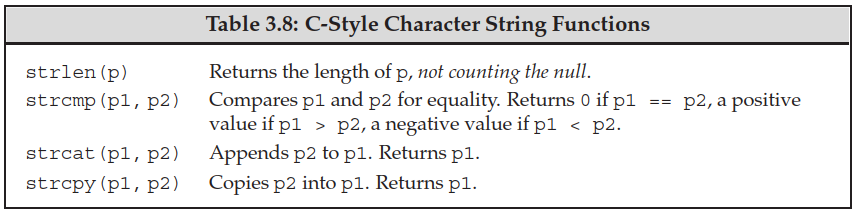
Interfacing to Older Code
strings and C-style strings:- We can use a null-terminated character array anywhere that we can use a string literal: initializing a
stringorstringconcatenation (+). string::c_str()returns a pointer to a null-terminated character array that contains the same sequence of characters as the string object. Changing the string will invalidate the array.
- We can use a null-terminated character array anywhere that we can use a string literal: initializing a
- We can use an array to initialize a
vectorby passing two pointers to thevectorconstructor:vector<int> v(begin(arr), end(arr));.
3.6 Multidimensional Arrays
- Multidimensional arrays are arrays of arrays:
int ia[3][4]is an array of size 3 whose elements are arrays ofints of size 4 (read from inside out -int (ia[3])[4]). - Initializing the elements:
- We can initialize a multidimensional array using a bracketed list of initializers. The nested braces are optional.
- Elements may be left out of the initializer list:
{{0}, {4}, {8}},{0, 3, 6, 9}.
- Subscripting a multidimensional array gives the inner-array element at the specified index.
- Range
forcan also be used on multidimensional arrays. However, for outer loops, loop variables should always be defined as a reference (auto &/const auto &). Otherwise, they will be converted to pointers - the same behavior asauto x = arr;. - The multidimensional array can be converted to a pointer to the first inner array (not the first element).
- The type of inner arrays can be aliased or defined as
auto. Or we can use type aliases for types of inner arrays to improve readability.
- The type of inner arrays can be aliased or defined as
// p points to the first array in ia
for (auto p = begin(ia); p != end(ia); ++p) {
  // q points to the first element in an inner array
  for (auto q = begin(*p); q != end(*p); ++q)
    cout << *q << ' '; // prints the int value to which q points
  cout << endl;
}